This page contains information about interpreting the results of a FreeBMD search.
There is information on how to perform a search, and do so efficiently, in the search help. Information on subsidiary subjects related to the search results
are answered in the Search Results FAQ.
Results Page
When you do a search that has found some entries you will be shown the results like this (the
numbers refer to the notes following):
Notes
The FreeBMD database is a transcription of the GRO index and is copyright. Please
read the Terms and Conditions for information on how you are allowed to use the data.
To repeat the search with different parameters click on Revise Query or to
do an entirely different search click on New Query
- do not use your browser Back button
You can save the results of a search so that when more records are added to the
database you can see what they are - see here for more details.
You can download the results of a search in spreadsheet format for further
processing - see here for more details
Various symbols are used in the presentation of the results and this box explains
what they mean - if you need more details see here
The parameters that you used to do the search are shown - if the search does not
give the results you expect check that you have given the parameters you meant to
You are advised to check an entry before ordering a certificate - if the spectacles
icon is shown you can view the original scan to do this check
If you find an error, that is where an entry does not correspond with what is in the
GRO index, you can report it using the icon
The results are grouped by quarter which is specified by the event
(Births, Marriages or Deaths),the last month of the quarter and the year when
the event was registered (which may be some time after the event took place). However, from
1984 onward the results are grouped by year only, so only the year is given (click on the
icon to view the registration month). See also
here for a fuller explanation.
FreeBMD is work in progress and many quarters are not yet complete - the percentage figure
gives an indication of how completely transcribed the quarter is and further information
can be found here.
Each entry is shown with the items as in the heading - if the entry is in bold, as here,
then the entry has been confirmed by being transcribed more than once and the assurance of
accuracy (i.e. being the same as in the GRO index) is greatly increased
Clicking on the page number will show all the entries on the same page of the
register - this is particularly useful when searching for the
spouse but of little value otherwise - see here for more details of how entries are organised into pages
These icons give you information about the entry and clicking on an icon takes
you to another page with further details
Additional information in the index
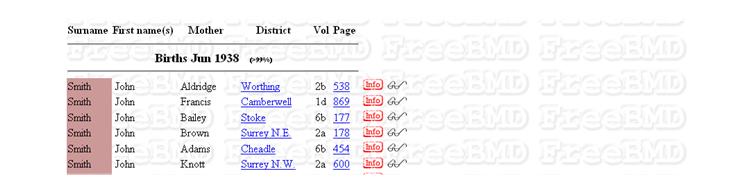
The information in the index is different for different years. Here is what a similar search
to the above produced but for 1938. Note that the mother's maiden name now appears. Note also
that these entries have only been transcribed once and so are not in bold.
The dates when information was added to the index are as follows:
Date
Quarter
Information added
Event
1st Jul 1911
Sep 1911
Mother's Maiden Name
Births
1st Jan 1912
Mar 1912
Spouse's Surname
Marriages
1st Jan 1866
Mar 1866
Age at Death
Deaths
1st Apr 1969
Jun 1969
Date of Birth (replaced Age at Death)
Deaths
1st Jan 1984
Month of Registration
All
The format for the Date of Birth is DDMMYYYY where DD is a one or two digit day, YYYY
is the year and MM is the month as below
If none of the above answer your question, and it relates to how the search (or the website in general)
works, you can email . You must not use this method to report errors
in entries, or missing entries; instead see the item on
corrections.
I'd like to save the results I got so I can view them at my leisure without being online. How can I do this?
This depends on your browser. You can sometimes use File/Save As to save the current page and view it later. However, with some browsers the Search page rather than the Results page is saved. An alternative is to use the offline/history facility of your browser to view pages you have visited, without being online. Select Work Offline in your browser, then open the History and select the FreeBMD site, and then the page you want to view.
You can also use the download facility - see here.
Why couldn't I find this entry which I have seen in the books at the Family Record Centre?
You must understand that FreeBMD is Work in Progress! We are still transcribing the indexes - you can see the progress on the progress charts - so your entries probably haven't been transcribed yet. Perhaps you would like to help in the transcribing? See how to join up.
I have found an entry that is different from what is in the index. How do I report this
so it will be corrected?
Click on the button next to the entry and then click on the link
for submitting corrections. Note that corrections will only be accepted if you can show that the
entry is different from what is in the index; differences from other sources (such as a certificate)
will not be accepted - please see here for further information.
I've noticed that in the results some of the districts are in Italics. Why is this?
This means that there is something wrong or unusual about the district name, volume or page, specifically
one of the following:
The district name found in the index differs from the standard district name and therefore there is
a possibility that the district in the index is incorrect
The volume number is not the one expected for the district in the year and quarter of the entry
The page number is not within the expected range for the district and volume number in the year and
quarter of the entry
I have found a relative and I want to contact the person who put in the record to see if we are related. How can I do this?
You need to understand that almost all of the records in FreeBMD were transcribed by people who had no
interest in the actual entries themselves, they were giving their time and skill to provide a searchable index.
However, you may be fortunate and the transcriber may have been transcribing family records, for example.
To find out, click on the button next to the entry and then click on
the name of the transcriber. If an email address is given they may have an interest in the record; if there
is no email address then they do not have an interest in the record. Please note that in this latter case
there is no point in leaving a postem to try to contact them - the
person who transcribed the record is very unlikely to see it.
Could you please tell me how to obtain information from the
red "info icon" that appears on the end of an entry - when I click on it nothing happens?
The information appears in a separate window or tab (depending on your browser settings). Unfortunately some browsers do not always bring this window or tab to the foreground leaving you with the impression that nothing has happened. Look at the list of windows or tabs and you should find the window/tab you are looking for. The same applies to other links, such as Districts or the spectacles icon.
On the search page the legend says a
"Change of shade means entries are not contiguous".
What does this mean and what causes it?
Where there are other entries in the index between consecutive entries in the
search results there is a change of shade. This can arise for the following reasons:
The search criteria themselves produce non-contiguous entries, e.g. all the entries registered
in a particular district
The data between the entries has not yet been transcribed
It has not been possible to automatically determine that transcribed pages are consecutive;
we manually correct these where we find them
I did a search but no results were displayed and no message saying no entries were found. Why has this happened?
If the results page was displayed but there are no results (and no message
saying no results were found) you are probably having problems with the use
of JavaScript. We use JavaScript to make displaying the results more efficient
but some browsers, even though they claim to support JavaScript, don't provide
implementation sufficient to display the results. For example, some web TV
systems fall into this category.
You say how many searches were done on FreeBMD but I find that two thirds of my searches fail.
You can look at the details of the number of searches that were done here. You will see that very few actually fail on the server (failed searches are indicated by the part of each bar that is not red).
The design of FreeBMD is such that we always return a result from a search - if the server is too busy we say so, if the search took too long we say so ... we don't just say nothing. If you are getting no response from your searches it is probably a communications problem between you and us, and most likely a problem within your ISP. We have been told of people living next door to each, but using different ISPs, who get very different responses times.
If you get ERR03: Time Out this could be due to using your browser Back facility to return to the search screen - always use the Revise Query button.
From time to time my searches fail, for example because they are "too complex". What are the limits on searches?
There are a number of limits that are imposed on searches in order to make sure one person does not stop other people searching by using all the capability of the system. The limits imposed are as follows:
More than 3000 results were found (we suggest you use the Count option first to determine if this limit would be exceeded)
The search was too complex. The details of precisely how we determine a search is "too complex" are too difficult to explain here but we give hints on simplifying searches if this error occurs
The search was taking too long (currently 3 minutes)
There were too many other people trying to do searches at the same time (currently about 100)
I know that new records are currently being added to FreeBMD. How can I see only those that have been added recently?
You should use the Saved Search facility which enables you to see only those records added since you last did a search. See Saved Search Help for more information.
I think I need to get the results displayed without using JavaScript. How do I do this?
JavaScript is a system that runs within a browser to generate information more efficiently. Our search results page detects automatically if JavaScript can be used. However, there are some situations where you might want to display results without using JavaScript. To do this use the following to define a search http://www.freebmd.org.uk/cgi/search.pl?js=0
For a particular volume/page in marriages there are five women, two of whom are named Sarah Jemima , one surname Bimrose, the other surname Bilton. What is the significance of this?
Such cases are very common in the indexes, and usually indicate a person who was born illegitimate, but adopted the surname of her mother's husband (whether it was the father or not).
To take the above example, if Miss Bimrose had an illegitimate child, Sarah Jemima, that child would be Sarah Jemima BIMROSE. If Miss Bimrose then married Mr Bilton, it would be common for the child to go by the name of Sarah Jemima BILTON.
When Sarah married, she would be shown on her marriage certificate as Sarah Jemima BILTON otherwise BIMROSE, and the index will show her under both names.
I did a marriage search and got a Henry Teslar and a Henry Testar recorded in the same district/volume/page. Is this an error?
Probably not. When the index was created, where the register was unclear two entries were created in the index. So in this case there is only one person, named either Teslar or Testar.
If the names are not similar then it is likely that the names are aliases for the same person, that
is the person was known by two different names.
I did a births search and got a two entries that are almost identical apart from the page number. Can there really be two such people?
You should look at the Original Scan (click on the icon):
If there is one entry then these are the same entry in the index transcribed by two different transcribers. We transcribe each record more than once to improve accuracy but, until the differences have been reconciled, you will find more than one record in the results. By looking at the original scan you can determine which version you think is correct (and if appropriate you can submit a correction).
If there is more than one entry in the scan, the entries may be for the same person registered twice or they may be different people. The only way to find out is to order the certificates for each one.
Having found possible spouses, by clicking on the Page (see Finding the spouse), how can I easily get back to the search screen to search for possible spouses for other entries?
When you click on the Page, hold down the SHIFT key at the same time. This will cause the results to be displayed in a different window, leaving the original search results in their own window. To do the next spouse search just go back to the original window.
I clicked on Revise Query and underneath the district list it says One or more districts initially selected - what does this mean?
If you do a search specifying one or more districts (or counties) and then click on Revise Query you get this message below the district (or county) list. It is there to indicate to you that if you do the search again it will still be limited to those districts (or counties) and is necessary because the selected items may not be visible in the items displayed. The message does not change if you subsequently change the selection, for example to All Districts (or All Counties), which is why it says initially.
When an entry is in bold text it means that two transcribers have
independently transcribed it. This is called double keying and is
done to help improve the accuracy of the entries.
A search within a county is effectively a search of all the districts within
that county. However, a district can span two or more counties and therefore the
same entry can appear in the results for more than one county. When you do a
search on multiple counties such entries appear only once. See the
general information about districts
and also the specific details of which
districts are in which counties and when.
I have noticed that beside some entries there are symbols. What do they mean?
The meaning of the symbols that may appear next to the
button is as follows:
The scan from which the
transcription was made is available for you to view - click on the icon to do so.
A comment has been attached
to this entry by the transcriber. This may indicate what the
transcriber thought the entry should contain, especially where
the entry was unclear or inconsistent.
There is a Postem
attached to the entry. A Postem is a message from a researcher about
the entry, perhaps indicating additional information available or
seeking to get in touch with people with an interest in the entry.
See the Postem help for more
information about Postems; click on the
button to view the Postem associated with this entry.
The entry has been added
to the database since the previous update or has been changed since the previous update.
See the home page for when the current update was done.
See here for more information about identifying new records.
The entry is a System Entry,
that is an entry that is not in the index but has been added to the
FreeBMD database to correct an apparent error in the index. Click on
the button for more information including
details of any entry this System Entry may replace.
There is a System Entry
linked to this entry; click on the
button for more information including a link to the System Entry.
This means that the person transcribing the entry could not determine accurately
some characters in the entry. The special characters (called "Uncertain Format
Characters") define the level of uncertainty, for example * means one or more
unreadable characters, _ means one unreadable character and "[38]" means
either the digit "3" or the digit "8".
The complete definition can be found here.
I know that FreeBMD is "work in progress" with the number of entries increasing
as more entries are added to the database. How can I tell where new entries have
been added?
Our volunteers continuously transcribe more entries but we only
update the database about once a month since it is a big job to update over 300
million records. The date of the latest database update can be found on the
home page.
There are a number of ways that you can tell where new entries have been added.
The coverage charts indicate with a lighter colour
the proportion of entries that have been added to the latest database. However,
this only shows where there have been large numbers of additions.
You can use a Saved Search to list those
entries added since you saved the search. This is much more precise since it will
identify the additions where there have been just a few entries added to a quarter.
The symbol next to an entry means it has
probably been added since the previous update. The uncertainty is due to the
fact that if the record has changed, e.g. the page number has been corrected, it
will be marked as an addition.
I notice that in the quarter header in the search results there is a
percentage shown. What does this refer to?
The percentage figure indicates how much of that quarter we have transcribed so far.
The full coverage charts are given here. Please
note, however, that due to limitations in the data available this figure is only
accurate to within 2 percentage points, i.e. a given percentage of 84% means between 82% and 86%
of the entries have been transcribed.
I have checked with the scan and I have found an entry that has
not been transcribed although those round it have. How do I report this
so it can be corrected?
To report a missing entry you need to submit a correction to the
immediately preceding entry which you know since you have
looked up the scan. Search for this entry and click on the
button next to it, then click
to make a correction. Enter the details of the missing entry in
the correction form (only those fields that are different from
the preceding entry need be completed) and check the box Missing
entry or entries.
If there are multiple missing entries fill in the details for the
first and also check the box Multiple entries.
When I click the button, why are there one or more entries shown
that are slightly different from the search results?
The button shows you the actual transcriptions of the entry and
there may be more than one transcription for an entry in the search results because it has
been transcribed more than once. FreeBMD transcribes each page more than once to improve the
accuracy of the transcription. There may be differences between these transcriptions and the
search results for the following reasons:
There may be a different use of capital letters; FreeBMD does not consider the letter case
to be significant
The entries may contain symbols (e.g. * or _) that indicate uncertainty in the transcription
but the transcriptions match the entry when this uncertainty is taken into account
The transcriptions may contain different district names that have been linked together
by FreeBMD (see here)
The transcriptions may have been normalised to remove periods and some spaces (e.g. after Mac);
since the same normalisation is done for search terms this allows results to be found irrespective
of the typographical convention used
The search results use the arabic numeral version of the volume (e.g. 3) even if the
original scan used roman numerals (e.g. III) but the transcription will contain what is in
the scan.
Even if there is only one transcription it may differ from the search results for the last two
reasons given above.
In the search results I have found an entry with the district "St Olave" but this district
does not appear in the districts list on the search page for the year in question. Why not?
If you click on the district name ("St Olave" in this case) it will give you more information about
the district, including the name that it appears under in the district list. In the case of "St Olave"
it tells you that it is an alternative name for Bermondsey which is the name in the district list.
The issue of alternative district names is explained here.
I did a search and found a number of entries, but now when I search for them
they are not found. What has happened?
Very occasionally records may be deleted from the database, for example if the record is erroneous
or in the wrong quarter. However, by far the most likely cause is that you have done a search
using the wrong parameters and the most common mistake is putting the first name in the Surname
box and the surname in the First Names(s) box.
I have found a marriage record in September quarter 1841 where the page number is 216J.
What does this mean?
This entry relates to a Vicar sending his quarterly return to the GRO late. Briefly, every Vicar
in the country was supposed to send a return to the GRO for marriages during July to September
1841, to reach the Registrar General by the end of October. Particularly during the early
years of civil registration, some Vicars were very lax about complying with this (they
weren't happy about state interference in things that they saw as their domain), and often
sent returns outrageously late. At the GRO, all the returns for a particular Registration
District were gathered together, and placed in order (the dedication of the Church determined
the order, and RO marriages were at the back), and all the Registration districts in a volume
were likewise collated (in order of RD name). The pages were then numbered. When the return
for a particular parish arrived after this process was complete, the pages were inserted into
the proper place, and numbered with suffix letters. In that quarter of 1841 Southampton RD was
made up of pages 215-224. Thus, the first parish alphabetically was pages 215/216, 217/218 was
the parish that was second alphabetically (which got returns in on time) and 216 with a suffix
relates to churches that sent in late returns that lie between those two.
I have found two birth entries with the same surname, same quarter and same district. How can I
tell if these entries are for twins?
Basically there is no way you can tell for certain if they were twins but the registration information
can indicate the most probable situation. There are three possibilities to consider:
The two entries are for twins - in this case it is most likely that the page will be the same or one different between the two entries. However, one could envisage circumstances in which one twin was
registered later than the other - unlikely but a possibility.
The two entries are for different people - the page is likely to be different. Obviously if the mother's maiden name (post 1911 entries) is the same then being twins is more likely. Otherwise, for a very common surname or in a closed community with many people having the same surname it is not at all unlikely that two different people with the same surname could given birth in the same quarter.
The two entries are for the same person - whilst a child must be registered within 6 weeks, it remains possible up to the child's first birthday, to change the names in baptism and have the record amended resulting in a second entry for the same person. In this case, because one of the entries is a late registration it is likely that it will have a suffix page number.
I have been searching unsuccessfully for a double-barrelled surname. Are there any
special tips for such searches?
Remember that some double-barrelled names are joined with a hyphen (e.g. Bowes-Lyon) and
some are not (e.g. Vaughan Williams). The name may not have been recorded in the way you expect.
You can use a wildcard search on the surname
(e.g. Bowes* for all names starting with Bowes)
The entry may have been recorded with the first part of the surname appended as a given name, but
possibly recorded only as an initial (e.g. John Bowes-Lyon recorded as Lyon, John B)
I have found a record which has just a black page number instead of a blue link.
Why is this?
If the transcriber was unable to be certain about the page number they will have used a
particular convention to indicate the uncertainty. Because of this
uncertainty it is not possible to link to other records with the same page number and
therefore the page number is not a link. You may still be able to work out what the other entries
are on the page using the information given here.
Can I view online the original index page from which FreeBMD transcribed an entry?
In most cases the original index page can be viewed and this is indicated by the entry having a
spectacles icon next to it - click on the icon to view the page.
If you want to view an index page when no entry can be found, use the
wildcard search facility to find a nearby entry.
For example, if no entry for Linghorn has been found you can search for Ling* to see entries
that would be close by and then view the page for those.
If the index page displayed does not contain the entry, click on the link in "If the scan
does not contain the entry you may be able to find the scan yourself by clicking here." If you
find the correct page you are encouraged to leave feedback by clicking on "Confirm" so that
the correct index page will be shown for other researchers.
Each quarter the Superintendent Registrar for a district sends copies of his/her register entries to
the General Register Office who then apply a page number to the records for indexing purposes.
However, in some circumstances, e.g. when a birth is re-registered, a further supplementary
copy is sent by the Registrar to the General Register Office which supersedes the original
copy and in these cases the new entry is given a supplementary number.
This means an original page number in an entry such as 495 might be crossed out and replaced
by a page number such as 1659/S or the supplementary number might just be added to the page number.
There are a number of reasons for re-registering a birth, such as:
If at the time of registration the mother was not married to the baby's father, but they
have since married, it is a legal duty to re-register the birth, even when the father's details
were entered when the birth was originally registered.
If the natural father's details were not recorded at the initial registration but there is
now a wish to add them.
From the third quarter of 1911 onward birth entries in the GRO index included
the mother's maiden name. Where the mother's maiden name and the surname of the
child are the same there appear to be three possibilities
The mother married someone with the same surname (not at all unlikely for common
surnames or in closed communities)
The birth was registered with mother's maiden name instead of the father's surname
The mother was not married
The above are suggestions. FreeBMD has no information to support these assertions
and for a more definitive answer the GRO should be consulted.
Entries in FreeBMD are transcriptions of the original GRO Index. If you click on the spectacles icon next to an entry you can view a scan of the page from which the transcription was made.
To improve accuracy we try to transcribe each page twice. However, where the information is difficult to read this can lead to transcribers taking a different view of what the entry contains. This in itself is useful information because it indicates where there is uncertainty. You should view the page from which the transcription was made to make up your own mind about the correct transcription.
Please note that in some cases we have managed to obtain better scans but transcriptions from the previous (inferior) scans may still be in use.

 Search Results Help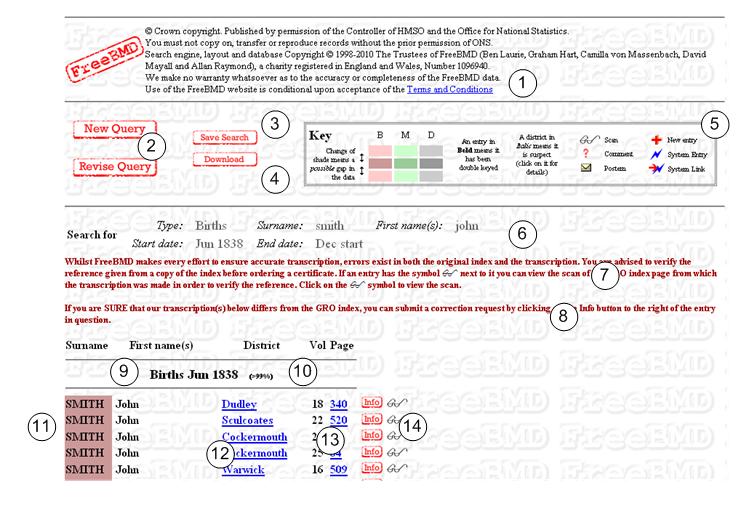
 is shown you can view the original scan to do this check
 icon
icon
 . You must not use this method to report errors
in entries, or missing entries; instead see the item on
corrections.
. You must not use this method to report errors
in entries, or missing entries; instead see the item on
corrections.